Approvals and budgets
Some things an agent should not decide alone: spending more than you planned, deploying, deleting. In GurtOS, a task can stop and ask, and spending over budget, or above the box's threshold, always stops and asks. The request reaches the portal and your phone live. The task waits. Every other task keeps going.
How a task asks
Section titled “How a task asks”A budget pause. Every task has a budget in US cents, budgetCents. A task that names none gets the box's defaultBudgetCents, which is $1 on a new box. Tools declare what each call costs with cost(input). Before the broker runs a paid call, it adds the call's cost to what the task has spent and to what its other calls in flight have reserved. If the total is over the budget, it asks first:
Spend $3.00 to Test Vendor on example.spend (test spend on coffee)? Budget $1.00, spent $0.00.A threshold pause. The box's settings hold approvalThresholdCents, $5 by default. A single paid call above it always asks, even when it fits inside the task's budget. Here the task's budget is $20:
Spend $12.00 to Test Vendor on example.spend (test spend on a camera)? Spends above $5.00 always ask.Only the owner changes these settings, with PATCH /api/settings from the box's own screen or an owner-paired phone. If the owner approved a question from this task that named an amount, such as "Buy 2 filters for $13.00?", spends up to that amount do not ask a second time, and the budget still caps.
On the Permissions page of Settings the owner can also give an app a daily money limit. A paid call from that app that would take it over the limit asks too.
An explicit ask. A worker can ask any yes or no question with POST /ask on its broker. Droid does this through the box_ask tool, and its own clarifying questions become approvals too. The Droid worker also asks on its own when a step that could do harm (a command that uses the network, deletes in bulk, touches keys or writes outside the workspace) looks off its task's goal to a separate Haiku check, or when that check cannot run. BOX_REVIEW=off switches the check off. An app's tool can also refuse to act and tell the agent to ask, as the credit desk does for decisions above an analyst's authority.
What happens while it waits
Section titled “What happens while it waits”- The core writes an
approval.askedevent to the log. The approval has an id, the question, the amount in cents, and for payments the payee and purpose. - The task's state becomes
waiting. - The core mirrors the approval into SpacetimeDB for the box's own screen, and the event reaches paired phones and connected apps through the log stream. All of them see it at once.
- The broker holds the worker's request open for up to 150 seconds (
BOX_APPROVAL_WAIT_MS). - If no answer arrives in that time, the broker returns
{pending: true}with "call again to check". The worker, or Droid, calls again and keeps waiting. So a task can wait hours for an OK, past any client timeout.
The wait limit exists because Droid gives up on a tool call after about three minutes. A shorter wait, repeated, keeps the call alive.
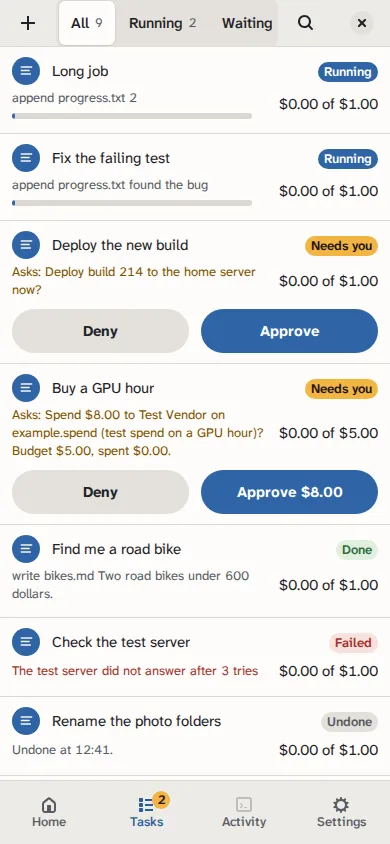
The portal on a phone, from a test box running scripted tasks. Amounts are test money.
Answering
Section titled “Answering”The box's own screen and every paired device can answer:
POST /api/approvals/<id> {approved}on the box's API. From the box's own machine,byin the body names who answered. From anywhere else the request must carry a paired device's token, and the core names the device, whateverbysays.- The
answerreducer in SpacetimeDB,answer({id, approved, by}). SpacetimeDB listens on127.0.0.1, and the reducer works only from a connection the box has vouched for: its own screen, or a paired phone that registered its connection. The answer is logged under that vouched name. - Optional apps that drive the box: the Jira panel's Approve and Deny buttons, and cards in an ASI:One chat.
The box's own screen answers through SpacetimeDB when it is connected, and through the HTTP API when it is not. It names itself box screen.
The first answer wins. Later answers to the same approval change nothing. The core writes approval.answered with who answered (portal, phone, jira:<name>, asi1, or a paired phone's name), wakes the waiting call, and moves the task back to running once nothing else of it is pending.
A paired phone answers over the HTTP API with its device token as Authorization: Bearer <token>. The core records the phone's name as by. An answer from off the box with no token, or an unknown or revoked one, gets 401 and changes nothing. See approve from your phone.
If approved, the paid call runs and its cost is counted. If denied, the call returns "not approved" and nothing is spent. The agent decides what to do next.
On GurtOS Business, a written policy sends each approval to the people who may answer it, within their limit, and nobody can answer a request they asked for. See turn on Business.
One approval per action
Section titled “One approval per action”An approval's id is the task id plus a key, and the key starts with who asked, so the box's own questions and a task's never share an id:
<task>.budget.<tool>:<hash>is a budget or threshold pause. The key is built from the tool name and a hash of its arguments.<task>.tool.<call>.ask.<hash>is a question a tool asks withctx.ask. It is built from the call's key and a hash of the question.<task>.task.<key>is a question the worker asks withPOST /ask. The worker supplies<key>, and the box putstask.in front of it.
So a worker cannot choose a key that matches the box's budget question and have a cheap yes count as the answer to it. The budget question is asked again, with the real amount. This has three effects:
- The same call retried, for example by Droid after its timeout, finds the same approval instead of making a second one.
- An answer to any copy of the request resolves the one approval.
- The approved call runs once and is charged once.
Closed at the end
Section titled “Closed at the end”When a task reaches done, failed or undone, the core closes any approval still pending for it, as denied. Nothing lingers in your inbox for a task that has stopped.
Budgets and parallel calls
Section titled “Budgets and parallel calls”Droid can make several tool calls at once. Before a paid call runs, the broker reserves its cost. A second call that arrives at the same moment sees the reservation. So two payments fired together cannot both slip under the budget. When a call finishes, its reservation is replaced by its real cost in the log.
Choosing a budget
Section titled “Choosing a budget”A budget is a threshold for asking, not a hard cap. Spending above it is possible, but only with your OK, one call at a time. Set it to what you would spend without wanting to be asked. A budget of 0 means every paid call asks. The box-wide approvalThresholdCents sits above every budget: no single call over it runs without an OK, except one the owner already approved by name, as above.
The budget check runs only before a paid tool call, so a task that only uses the model never pauses for budget. Model cost still counts as spent, so it uses up budget that later paid calls check against. See cost.