
Set up the shopping agent
The Shopper app turns shopping into standing instructions. "Get me the coffee filters when they're under $7." The box checks the store on a schedule. When the item is in stock at or under your price, it asks for your OK, and pays only after you approve. It can also read household receipts and propose a reorder. In this guide you set up the app and run one watch from start to purchase.
Before you start
Section titled “Before you start”- A box installed on Ubuntu, with a root shell and a source checkout. See Install on Ubuntu.
FACTORY_API_KEYin the vault, so Droid can turn your words into a watch and read receipts.- Optional: a Stripe account in test mode, for test-mode charges instead of simulated ones.
- Optional:
APIFY_TOKENin the vault, for live price checks at Best Buy Canada.
-
Add the app's keys to the vault. From the checkout, as root:
sudo tracks/shopper/setup.shIt adds what is missing and leaves existing values alone:
Key Value SHOPPER_CARDpm_card_visa, Stripe's test PaymentMethod for the Visa test cardSHOPPER_AGENT_KEYA new Ed25519 private key the box signs checkouts with SHOPPER_MAIL_PASSWORDA new random password for the sample inbox -
Optional: add a Stripe test key. Add it by hand. The store refuses a live key.
STRIPE_SECRET_KEY=sk_test_your-test-keyUntil it is there, payments are simulated and labelled so.
-
Restart the box service so it reads the vault.
sudo systemctl restart box.service -
Open the app. In the portal, open Shopper (test payments), or browse to
/t/shopper/on the box. The store is at/t/shopper/store. Open it on the box's own screen, or through an SSH tunnel to the box. From another device the box asks every request for a paired device's token, and the app's pages do not send one yet. -
Make a watch. Type what you want in words, or fill in the store, product, price limit and quantity and click Set up watch. For example: "Two packs of the V60 paper filters when they're under $7 each." Droid finds the product and sets the rule with the
shopper.watchtool. It cannot buy anything itself.With the API instead:
curl -s http://127.0.0.1:7700/t/shopper/watches -H 'content-type: application/json' \-d '{"store": "test", "product": "HV60-100", "maxCents": 700, "qty": 2}'HV60-100is the test store's Hario V60 filters.storeistestfor the GurtOS Test Store, orbestbuy.cafor a live check through Apify, whereproductis a Best Buy SKU or search words. -
Wait for the price. The box checks the store on a schedule. Each check is a task with no network and no secrets, and its result goes into the action log. To try it now, drop the test store's price:
curl -s http://127.0.0.1:7700/t/shopper/store/admin -H 'content-type: application/json' \-d '{"sku": "HV60-100", "priceCents": 650}' -
Approve the purchase. When the item is in stock at or under your limit, the box starts a purchase task. It asks:
Buy 2 × Hario V60 02 paper filters, 100 count for $13.00? $6.50 each, down from $8.99, under your $7.00 limit. TEST PAYMENT.Tap Approve on the phone or in the portal. Only then does
shopper.buysign the order and pay the GurtOS Test Store.
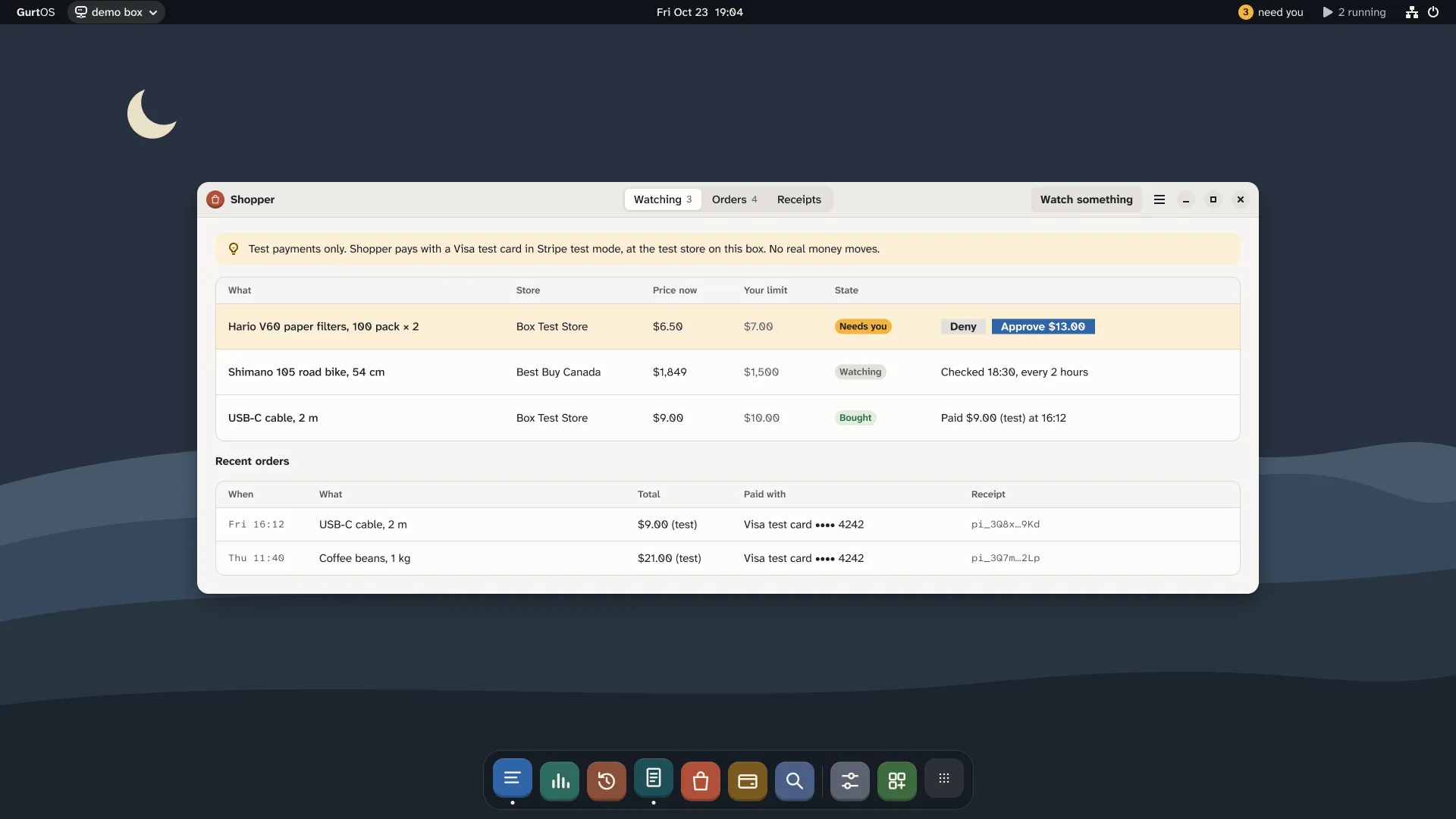
Shopper, from the current design. Every payment is test money.
Reorder from receipts
Section titled “Reorder from receipts”Under Household reorder in the app, click Check the receipts, or call POST /t/shopper/reorder. Droid reads the receipts in the sample inbox with shopper.receipts, works out what runs out this week, and proposes one reorder with shopper.propose. You approve or deny it the same way.
shopper.receipts returns receipts only, and says how many other emails it left behind. The agent never sees the mailbox password or your other mail. shopper.propose takes product codes and quantities, and looks up the prices itself, so a confused or hijacked model cannot make up a price.
Check it worked
Section titled “Check it worked”- The order shows in the app and at
/t/shopper/store, marked as a test payment. GET /t/shopper/statelists watches, pending approvals, recent tasks and orders.- The purchase task's log has the approval, the checkout and its cost. No secret appears in the log.
- Undo the purchase task. The store refunds its order.
How a purchase is made safe
Section titled “How a purchase is made safe”- The model never holds a buy tool or a card. Only purchase tasks the box starts hold
shopper.buy, and each one asks you first. - Two gates on money. Your tap, then the task's budget: your limit times the quantity. A purchase above the budget stops and asks again.
- Signed orders. The box signs each checkout with an HTTP message signature in the style of Visa's Trusted Agent Protocol (Ed25519, with a nonce and an 8-minute expiry). It also signs a digest of the body. The store refuses unsigned orders, changed orders, replayed signatures, expired signatures and unknown keys. The box publishes its public key at
/t/shopper/keys/box-shopper. - Power cuts don't pay twice. Each checkout carries the call's stable key as its idempotency key, at the store and at Stripe.
- Test money only, enforced. The store refuses a live Stripe key, a simulated charge accepts only Stripe's test cards, and orders above $500 are refused.
- One proposal and one watch per agent task, so a looping agent cannot flood your phone.
Routes
Section titled “Routes”All under /t/shopper/ on the box's API.
| Route | Does |
|---|---|
GET / |
The app |
GET /state |
Watches, pending approvals, recent tasks, orders, and which keys the vault has |
POST /watches {store, product, maxCents, qty?, when?, everyMinutes?} |
Watch a product |
POST /watches/check {id}, POST /watches/cancel {id} |
Check now, or stop watching |
POST /ask {text} |
Droid turns your words into a watch |
POST /reorder |
Droid reads the receipts and proposes a reorder |
POST /supplies {url, cents} |
An agent buys a supply from an x402 API through the wallet app: it asks the price first, then pays exactly that, and asks you first when the price is above cents. Test money. |
GET /store, GET /store/products |
The GurtOS Test Store |
POST /store/checkout |
Checkout. A signature and an idempotency key are required |
POST /store/admin {sku, priceCents?, inStock?} |
Test controls: change a price or the stock |
GET /keys/box-shopper |
The box's public signing key |
Limits
Section titled “Limits”- A watch closes after one purchase, or when you deny it. Watch again for another.
- The running-low estimate assumes each purchase lasts until the next, whatever the quantity.
- The test store keeps price and stock changes in memory. They reset when the box restarts. Orders are on disk.
- The store remembers used nonces in memory. After a restart, a captured signature could be sent again within its 8 minutes, but its idempotency key still returns the first order instead of charging twice.
- The inbox is a sample mailbox on the box with receipts written for testing. Connecting a real mailbox is not built.
- Best Buy Canada prices are in Canadian dollars, converted at a fixed rate against budgets in US cents.
Related
Section titled “Related”GurtOS is open source under the Apache License 2.0.Source code on GitHub.