
Search your files with /find
The Find app keeps one index of every photo, text file and finished task on the box. A vision model describes each photo once, when it arrives, so a search for "the whiteboard photo" finds photos/IMG_2041.jpg. Agents search the same index through a tool, with no network and no keys of their own. In this guide you connect the index, check which model describes photos, and run a search.
Before you start
Section titled “Before you start”- A box with a root shell and the Find app installed (it ships with GurtOS, in
tracks/find/). - A Moss project, with its project id and key, for search by meaning. Without one, search falls back to matching words.
- At least one vision model the box can reach. See step 2.
-
Add the Moss keys to the vault. See Add a secret.
MOSS_PROJECT_ID=your-project-idMOSS_PROJECT_KEY=your-project-keyRestart the box service. Moss runs inside the box: it embeds documents and answers queries in the box's own memory, so a search never waits on the network. A Moss session is open only while someone searches, and closes after 2 quiet minutes, because Moss bills open sessions by the minute. Search never needs Moss's cloud. To keep a cloud copy too, set
FIND_CLOUD_SYNC=1in the box service's environment: the box then pushes its index when a session closes, at most every 10 minutes and only when it changed. Only text goes there (descriptions, file text and task summaries), never a photo. -
Check the vision models. The box tries each model in order, and the first that answers wins:
- A model behind any OpenAI-compatible chat API that you run, such as Ollama on a machine on your network. The photo stays on hardware you control.
- A hosted model behind an OpenAI-compatible API, with its key in the vault (for example
VULTR_INFERENCE_KEY). - Claude, as the backup, through one Droid task. It needs
FACTORY_API_KEY.
The list is
MODELSintracks/find/find.ts: a model name, a base URL, and the name of a vault key if it needs one. The list that ships points at the developers' test machines, so edit it to point at your own model, then install again. A model that fails is skipped for 5 minutes, so a dead one costs one timeout, not one per photo. -
Add files. The app makes a
photosworkspace on first start with four test images. Copy your own into any workspace:sudo cp ~/Pictures/*.jpg /var/lib/box/workspaces/photos/The box rescans at boot, after every task, and every minute for files copied straight into a workspace.
-
Search with the app's route:
curl -s 'http://127.0.0.1:7700/t/find/search?q=whiteboard%20photo&kind=photo&k=3'
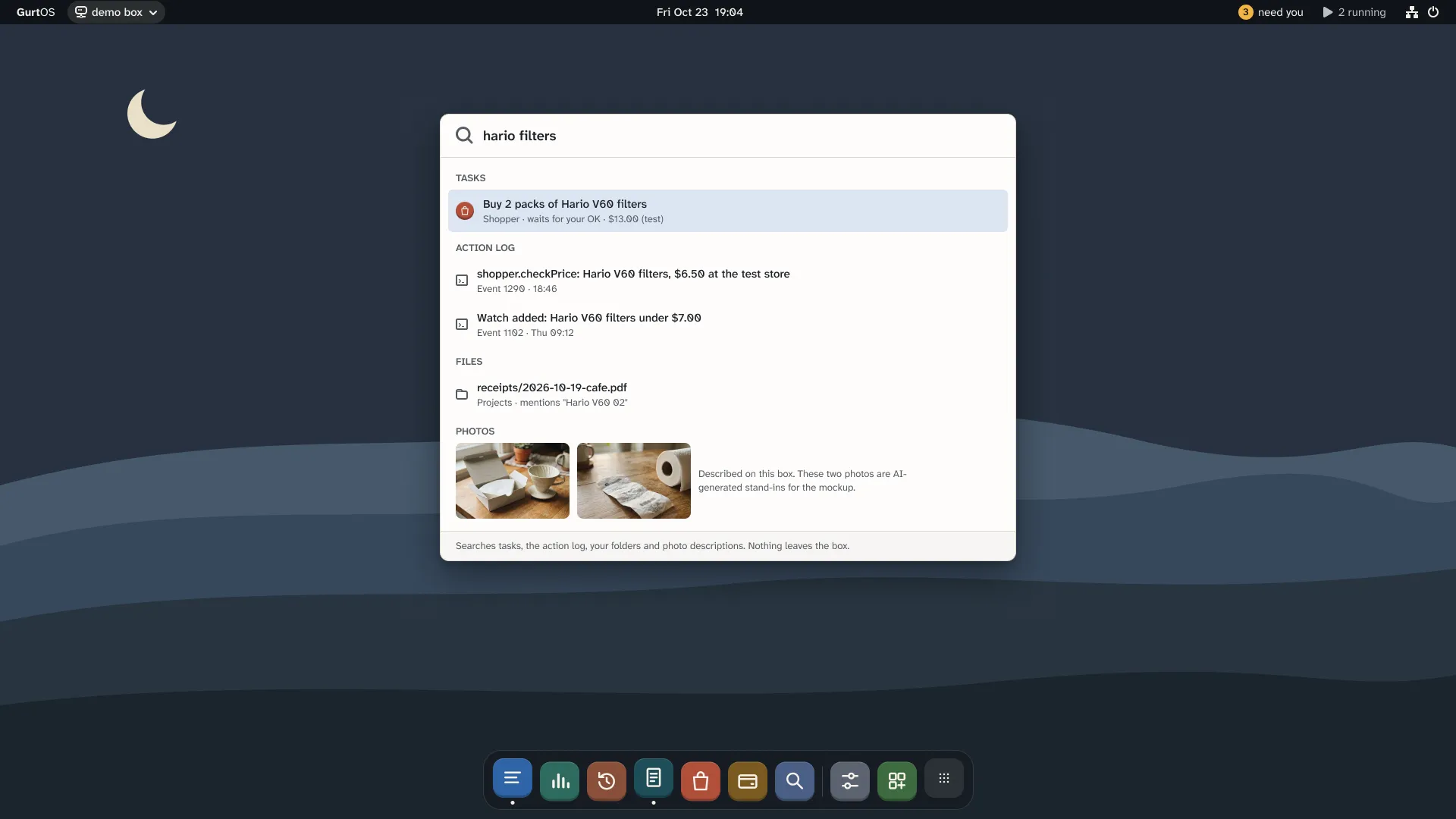
Find, from the current design. The data and photos are examples.
Check it worked
Section titled “Check it worked”curl -s http://127.0.0.1:7700/t/find/statusIt shows how many photos, files and tasks are indexed, and the models in the order the box tries them. Each search result says which index answered (moss, or words without Moss) and, for a photo, which model described it.
What gets indexed
Section titled “What gets indexed”- Photos (
.jpg,.jpeg,.png,.webp,.gif) in every workspace: the model's description. - Text files up to 200 KB in every workspace: the path and the first 2,000 characters.
- Tasks, when they finish, fail or are undone: the title, the state, and Droid's final message or the prompt.
The app reads each workspace as it is now: the base files plus every done task's changes. Undo a task and its files leave the index. Folders starting with ., node_modules and symlinks are skipped, so a task cannot point the index at the vault.
For agents: find.search
Section titled “For agents: find.search”A task that lists find.search in its tools can call it through its broker:
{ "query": "find the whiteboard photo", "kind": "photo", "topK": 3 }It returns { query, index, ms, wallMs, results: [{ kind, workspace, path, task, state, model, score, text }] }, best first. The task holds no Moss key: the tool runs inside the box service.
Routes
Section titled “Routes”All under /t/find/ on the box's API.
| Route | Does |
|---|---|
GET /search?q=<words>&kind=photo|file|task&k=5 |
The same as find.search |
GET /file?workspace=photos&path=IMG_2041.jpg |
The file a result points at. Only inside a workspace; symlinks are refused |
GET /status |
Counts, and the models in order |
Other apps can describe a photo with box.job('find.describe', { file }).
Limits
Section titled “Limits”- Photos go to the model at full size. Large phone photos are slow to describe.
- Only the first 2,000 characters of a text file are indexed.
- A failed Claude backup task is not retried until the box restarts.
- Any task given
find.searchcan search every workspace, not only its own. - Search results are data. A photo with text in it can carry that text into an agent's context, so treat results like any other untrusted input.
Related
Section titled “Related”GurtOS is open source under the Apache License 2.0.Source code on GitHub.